Are these wallets run by the same people? A Skill that finds five kinds of on-chain evidence
Transfer records show who has dealt with whom, not who is on the same side. This post covers five kinds of on-chain evidence that show several wallets are run from the same back office, and a Skill that finds them automatically and charts them.
Transfer records can tell you who has dealt with whom. They can’t tell you who is on the same side.
Say you have a batch of suspicious wallets. They have all sent money to each other, but exchanges, USDT-exchange merchants and payment channels have also transacted with all of them. Pull up any one wallet and there are hundreds of counterparties, every one of them “connected.” When everyone is connected, the connections mean nothing. There is really only one question to answer: among all these addresses, which relationships are the solid ones?
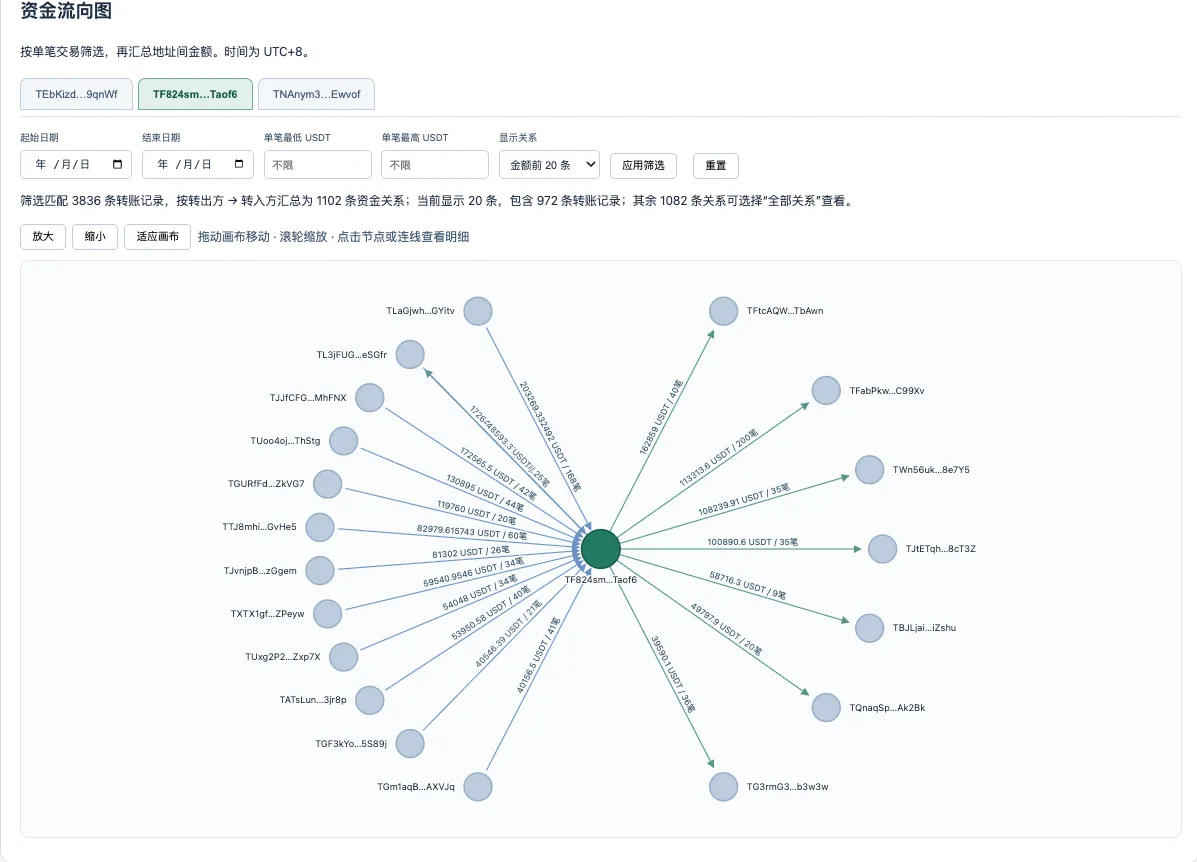
To stop paging through a block explorer one wallet at a time, I turned this way of judging into a Skill. You hand it the transaction history of a batch of wallets; it charts the flow of funds automatically, then uses five kinds of clues to find which wallets share the same “back office.” The chart below is the fund-flow chart it produces: switch between wallets, filter by date and amount, and click a line to see each transfer.
First the reasoning behind it, then what the five clues are.
Transfer chains can mislead you
Let’s start with a real example. The addresses are all public on the TRON chain, so you can check them yourself.
On February 28 this year, wallet A sent 46,045 USDT to wallet B. Twenty days later, B sent 40,000 USDT to wallet C. Between A and C there is not a single direct transfer, of any amount, in either direction.
Going by transfers alone, A and B are next to each other, while A and C are one step apart. If you ranked how close these three wallets are, B would certainly come before C.
But dig one layer deeper and the picture flips. A and C both got their first TRX from the same address: one received 240 TRX, the other 231 TRX, eight days apart. The energy and bandwidth that A and C burn when they send transfers were also delegated by that same address. Most damning of all is permissions: within minutes of receiving their first TRX, A and C both switched control of themselves to the same set of keys, and that address is in it too. B has none of these three. B’s first TRX came from somewhere else, that address isn’t among the dozen or so addresses that have paid for B’s energy, and B has never changed its permissions.
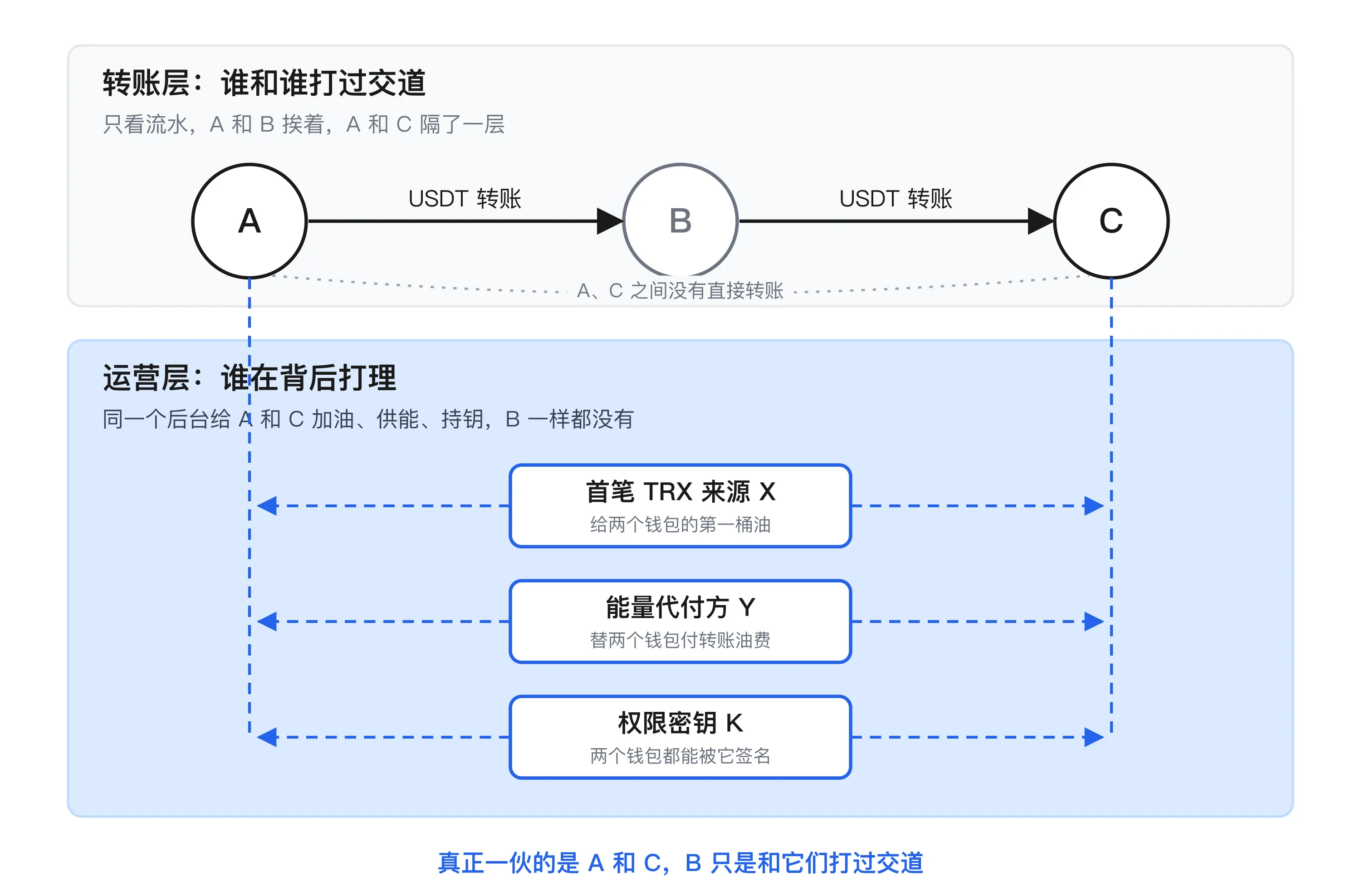
A transfer means “has dealt with.” Fueling, supplying energy and holding keys mean “run by the same back office.” Anyone can have the first kind of relationship: exchanges, merchants, passers-by. The second kind only shows up between wallets managed by the same operator. So A and C are the ones actually working together, and B is most likely just a pass-through: money leaves the system, changes hands once, and comes back into another wallet in the system.
This pattern isn’t a one-off. I ran a sample scan over local TRON data using the same criteria: in the sample pool there were 49 A→B→C chains where A and C share all three operational relationships and B shares none, and at least 480 where they share two. In one of them, two wallets received their first TRX in the same second and changed permissions in the same second, and money passing between them through B took only 99 seconds. There were also vanity-address wallets that came in pairs: the same source topped each up with 500 TRX 24 seconds apart, and 7 minutes later both wallets handed control to the same key.
The five kinds of evidence
What this Skill looks for is this kind of “shared relationship”: one outside address connected to two or more of the wallets you are investigating. It checks five kinds.
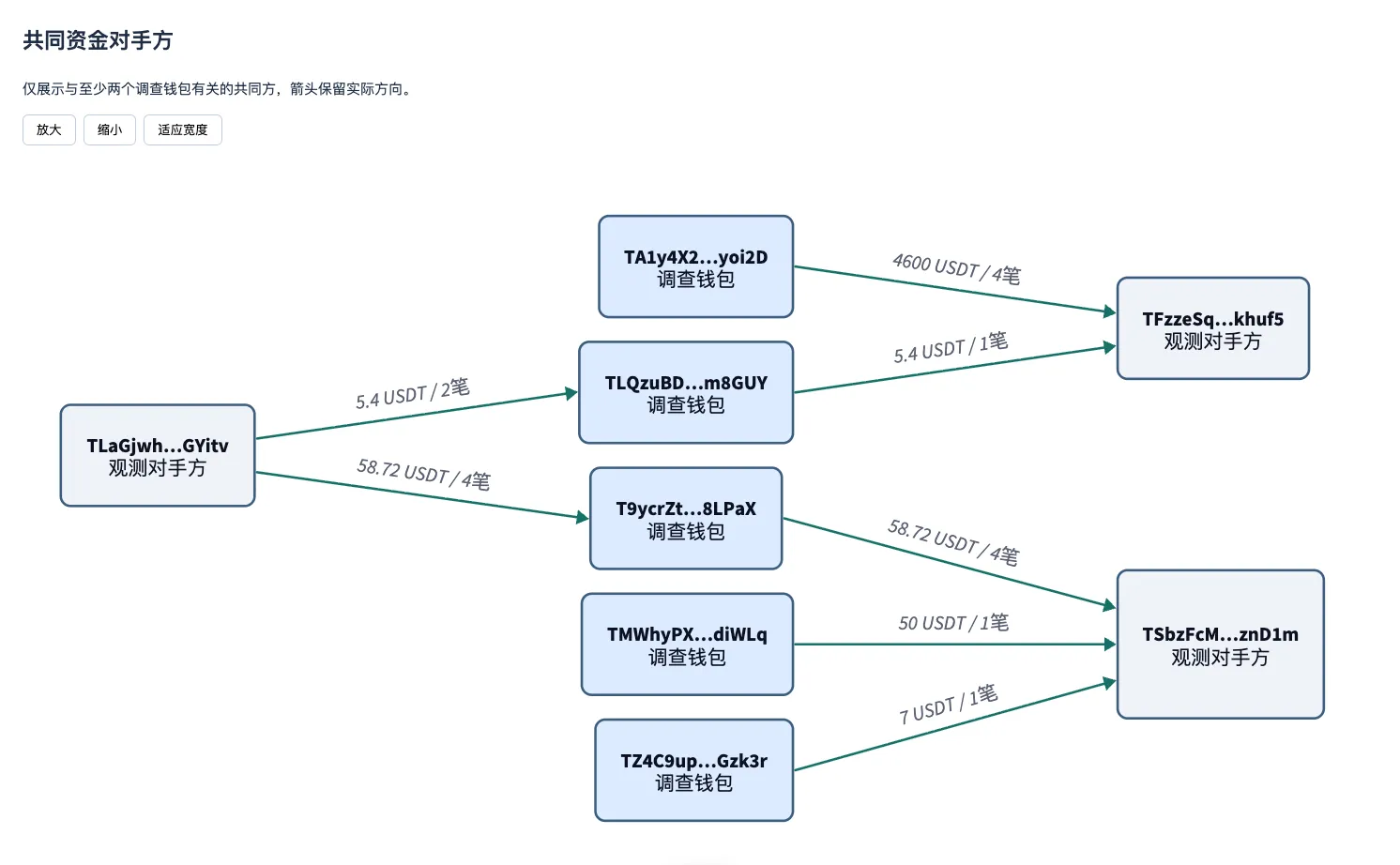
The first is a shared counterparty. Two wallets have both sent or received USDT or TRX with the same address. This is the most common and also the weakest kind, because exchanges and merchants end up as shared counterparties of many wallets. It’s useful for cross-checking against the other four, and for filtering out the genuinely large flows by amount.
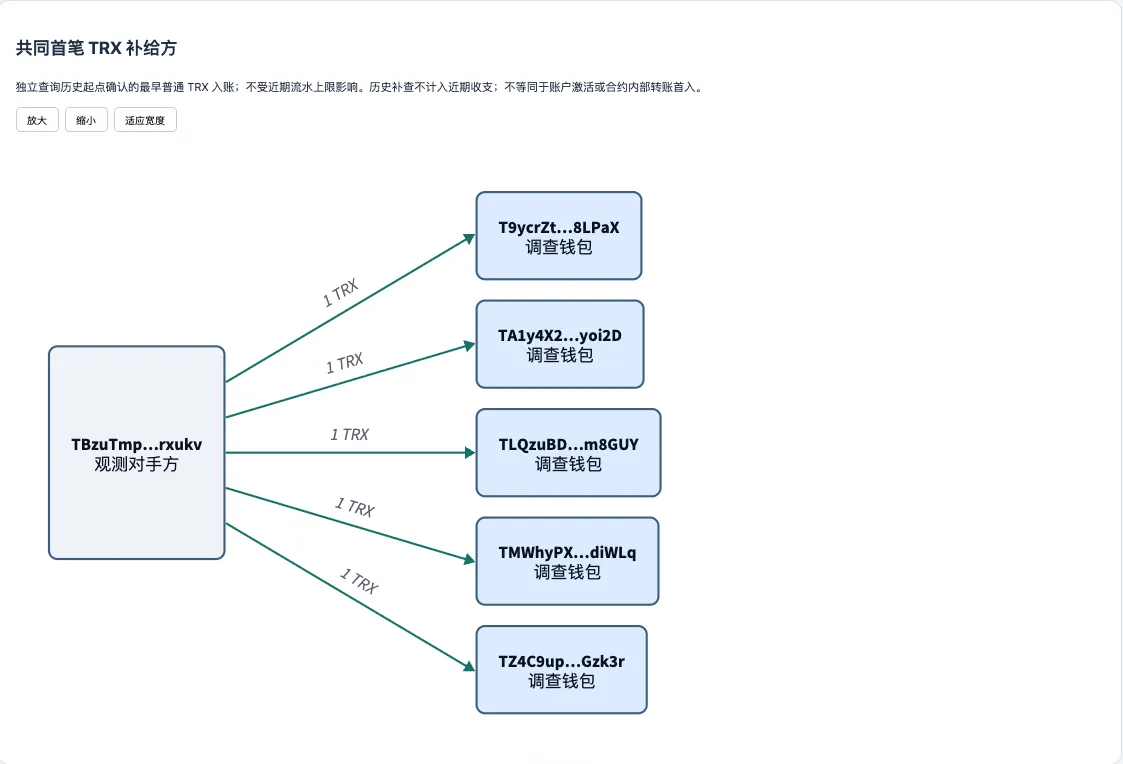
The second is a shared source of the first TRX. On TRON you need TRX as “fuel” before you can send USDT, so whoever sent a new wallet its first TRX is whoever “switched it on.” In the chart below, one address topped up five wallets with 1 TRX each. An ordinary counterparty wouldn’t do this kind of uniform “fuel handout” for you.
The third is a shared energy payer. The energy burned by a USDT transfer can be delegated to you by another address that has staked TRX. If the same address has delegated energy to two wallets, someone is paying the fuel bill for both. Be careful with this one: there are dedicated energy rental services that have delegated to thousands of addresses. That’s a public service, not evidence. The Skill marks both the number of delegations and the number of withdrawals on each line, so a rental service and an “in-house” pattern are easy to tell apart at a glance.
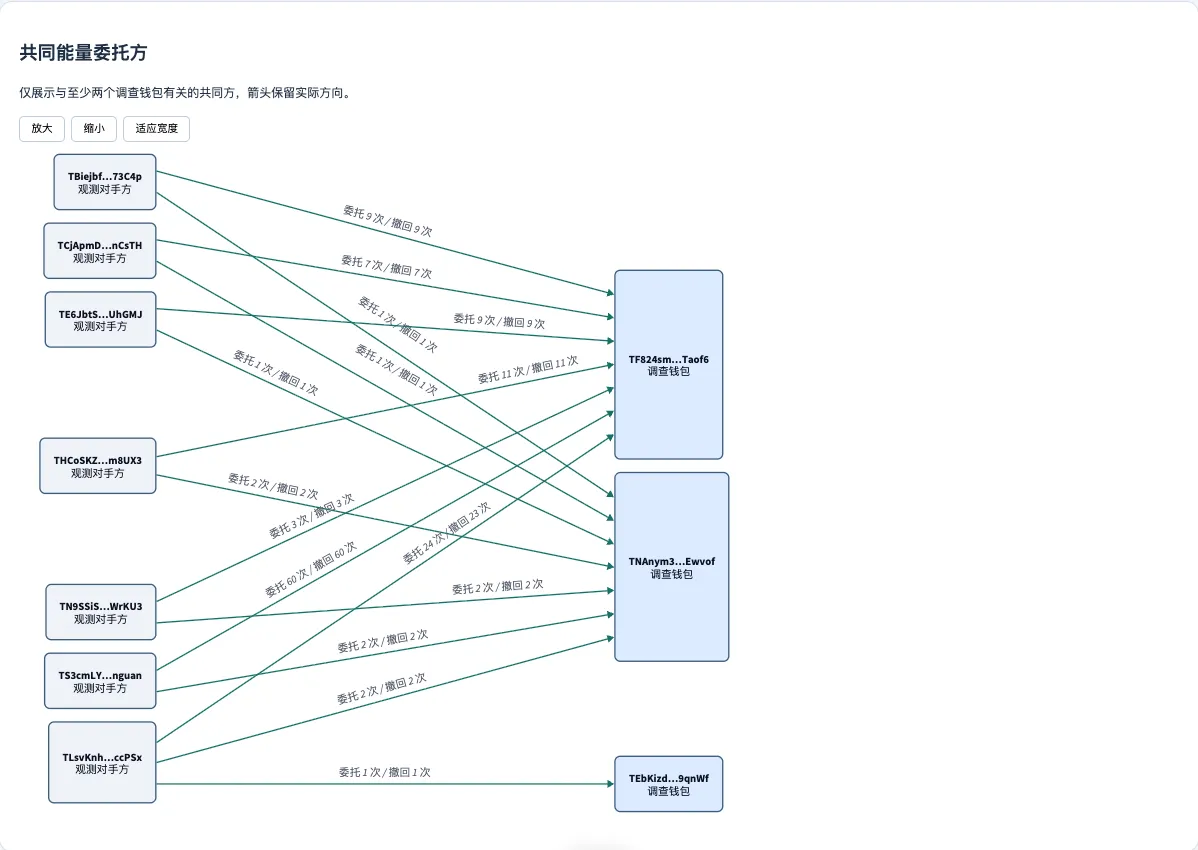
The fourth is a shared account creator. Some wallets aren’t activated “in passing” by a transfer; instead an address explicitly sends an account-creation transaction. Whoever created the account is clearly upstream of it. This one only counts with clear evidence of the creation fee; cases where only the timing matches are marked separately as “to be verified.”
The fifth is a shared permission key. A TRON wallet can hand control to another key, or be set up as multi-signature. If the same key appears in the permission settings of two wallets, one person can sign for both of them. My previous post covered how to check this one wallet at a time in a block explorer; the Skill turns it into a chart that shows configured permissions and actual signing records together.
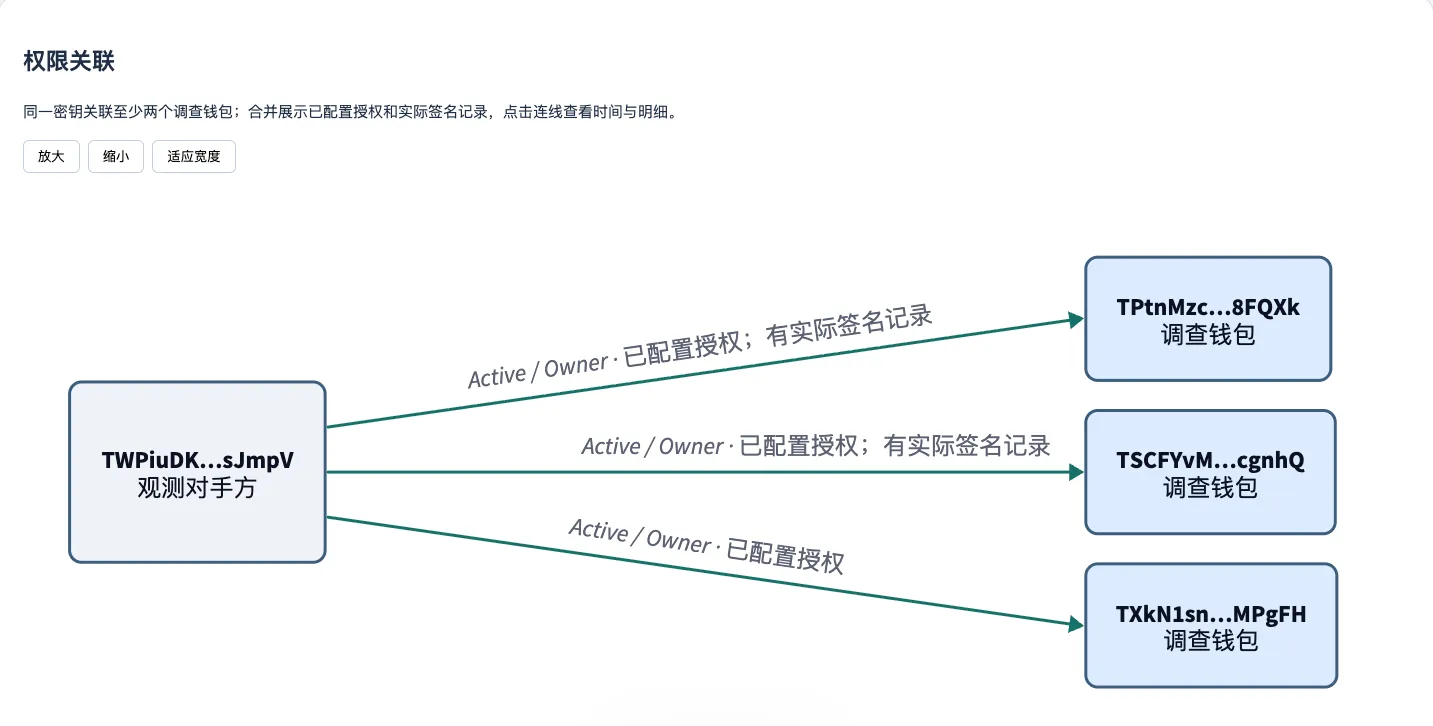
The last four have one thing in common: they are all “operations-layer” actions. A counterparty won’t pay your fuel bill, won’t hold your keys, and won’t create your account for you. So when any of these four shows up, it carries far more weight than a transfer.
Why checking by hand no longer works
For two wallets, the manual method from my previous post is enough. For a batch, it isn’t.
Comparing 8 wallets pairwise gives 28 pairs; checking five kinds of relationship for each pair makes 140 checks. Add hundreds of counterparties per wallet and there’s no way a person can keep up.
The first TRX is even harder. It’s buried in the earliest part of a wallet’s history. For a wallet that has been active for two years, you may need to page through dozens or even a hundred pages in the explorer to reach that first transfer, and exported histories often cover only the recent period, so they never reach it at all.
Permissions and energy delegation are scattered across different tabs. How many times a wallet has changed keys, how many addresses have delegated to it, when those delegations were withdrawn: these are exactly the things people miss.
Where the data comes from
The Skill takes two kinds of data; which one you use depends on whether you’re technical.
If you don’t write code, CSV exports from a block explorer are enough. On OKLink, open the wallet’s address page and export the transaction records and token transfer records. On TRONSCAN, export each of the Transfers, Transactions and Internal Txns tabs on the address page. You can mix files from both sites; the Skill recognizes them by file name and header, and if it can’t recognize a file it reports an error instead of forcing through the wrong format. The downside is that explorer exports usually cover only the recent period, so the older the wallet, the more likely its earliest transfers are missing.
If you can set up an API, pull data straight from TRONSCAN’s API. The data is more complete, and it can also look up each wallet’s true first TRX in its history, without the export limit. Apply for an API key in the TRONSCAN developer console and put it in a .env file:
TRONSCAN_API_KEY=your_keyThen have the Skill collect data by address. By default it fetches the most recent 10,000 records of each type; add a parameter if you explicitly want the full history. The key is only read from an environment variable or this file. It never goes on the command line and is never written into any output file, so sharing your results won’t leak it. How to apply for a key, and what data the API gives you that explorer exports don’t, is covered in an earlier post, “Let the AI agent query the chain itself: getting the most complete TRON data with the TronScan API.” The link is at the end.
How to use the Skill
It’s simpler than you might expect. The Skill is packaged as a .skill file, which is really a zip archive; you don’t need to unzip it. Drag it into the AI agent you use and say “install this skill,” and it installs itself. Then drag in your exported CSVs and say “use the wallet relations skill to analyze these wallets and see what shared relationships they have.” It does the rest: reads the instructions, runs the scripts, generates an offline web page, and finally gives you the page along with the conclusions it drew. Installation and usage details will get a post of their own next time.
The generated page has two parts. The first is the fund-flow chart at the top: a wallet may have thousands of transfers, so by default only the 20 largest relationships by amount are shown, and you can expand the rest if you want. The second part is one chart for each of the four kinds of shared relationship, drawing only the shared parties connected to two or more investigated wallets. Click a node to see the full address, click a line to see each transfer. Categories with no shared relationships are simply left out rather than drawn as empty charts.
It also has one habit: it doesn’t draw guesses as facts. By default each record type is capped at the most recent 10,000 records, and any truncation is flagged in red. When there’s no independent historical evidence, the first TRX is labeled only “earliest in this batch,” not “first top-up.” Where an account creation matches only on timing, without creation-fee evidence, the chart says “to be verified” explicitly. It would rather draw one line fewer than give you a line you can’t trace back to its source.
Before you use it
If you work on crypto cases, anti-money laundering or risk control and have a batch of addresses whose closeness you need to judge, it can compress three days of paging through explorers into a single script run.
What it produces is a list of evidence, not a conclusion that “these wallets belong to the same person.” An energy payer may just be a rental service, a shared counterparty may be an exchange, and a permission key may belong to a custody platform. Get at least two kinds of evidence that back each other up before you trace further.
There’s only one requirement: Python on your machine, any version from 3.8 up. No third-party packages, no charting software. If you can export a CSV from a block explorer, you can use it.
Sources:
- Let the AI agent query the chain itself: getting the most complete TRON data with the TronScan API (in Chinese)
https://mp.weixin.qq.com/s/or2FMmV-4ttC_c1RFVk8hg
We’re building AI agents for on-chain fund tracing. We want to turn this kind of wallet-relationship analysis, which people now do by paging through block explorers, into an investigation process where every line can be traced back to on-chain records, checked, and followed further. If this interests you, or you’re dealing with a problem like this right now, feel free to get in touch.