How to spot "hidden" links between two wallet addresses on OKLink
Two wallets that have never sent each other money can still be closely linked. This post shows how to check on OKLink how an address first appeared on chain, who can control it, and who lends it resources and takes them back.
Two wallets that have never sent each other money can still be strongly linked.
When analyzing a crypto wallet address, many people start by opening OKLink.
The easiest thing to find is the money relationship: whether the two addresses transferred to each other directly, or whether they share counterparties. When mapping out a group, people also often look at who made the first TRX top-up.
But if you only look at transfers, it’s easy to miss more direct evidence.
Step one: look at how the address first appeared on chain.
Two ideas need to be kept apart here:
- Creating an address: generating a private key and address in a wallet, SDK or command line. This happens locally and isn’t visible on chain.
- Activating an account: making the address appear in the TRON chain’s account state for the first time. This is visible on chain, and it’s the evidence we actually want to analyze.
Ordinary wallets are activated in three main ways:
- Receiving TRX or TRC-10: sending tokens to an unactivated address; the system activates the account as part of the transfer.
- Explicit activation: an existing account directly submits an
AccountCreateContract. OKLink usually shows this as “激活账户” (Activate Account). - Activation inside a contract: a smart contract sends TRX or TRC-10 to an unactivated address, and activation happens in an internal transaction of the contract.
Method one: activation by transfer.
In OKLink’s transaction details, start with the transaction type, the recipient and the TRX consumed. This kind of transaction just shows up as an ordinary “TRX 转账” (TRX transfer), with no extra “activate account” label. So you also need to open the recipient’s address and confirm whether this is the earliest on-chain record for it.
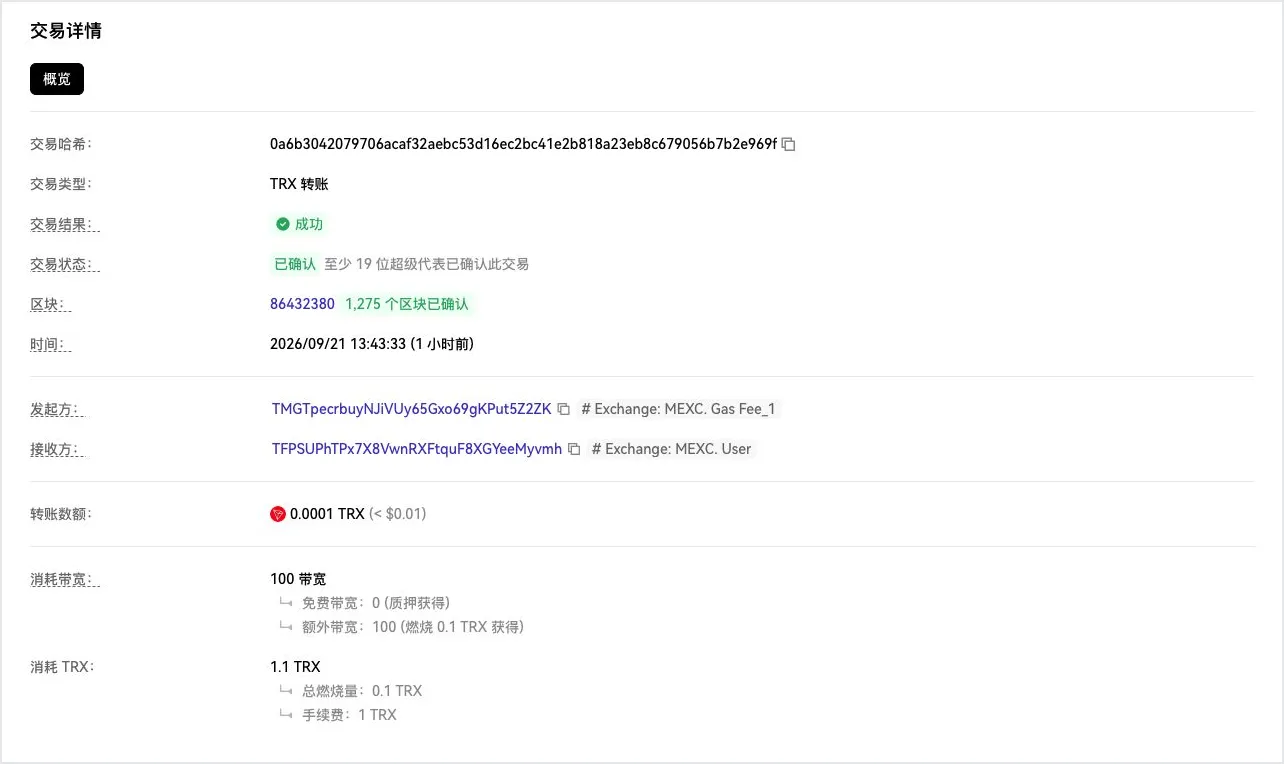
Figure 1: This 0.0001 TRX transfer is the recipient’s earliest successful incoming transfer. The page shows 1.1 TRX consumed in total, of which the 1 TRX fee is the cost of creating the account. Open the OKLink example
Method two: explicit activation.
The underlying type of this transaction is AccountCreateContract. It’s a system transaction built into the TRON protocol, not a call to some smart contract. In the figure, the “发起方” (initiator) is the creator and the one who pays, and the “被激活的地址” (activated address) is the new on-chain account.
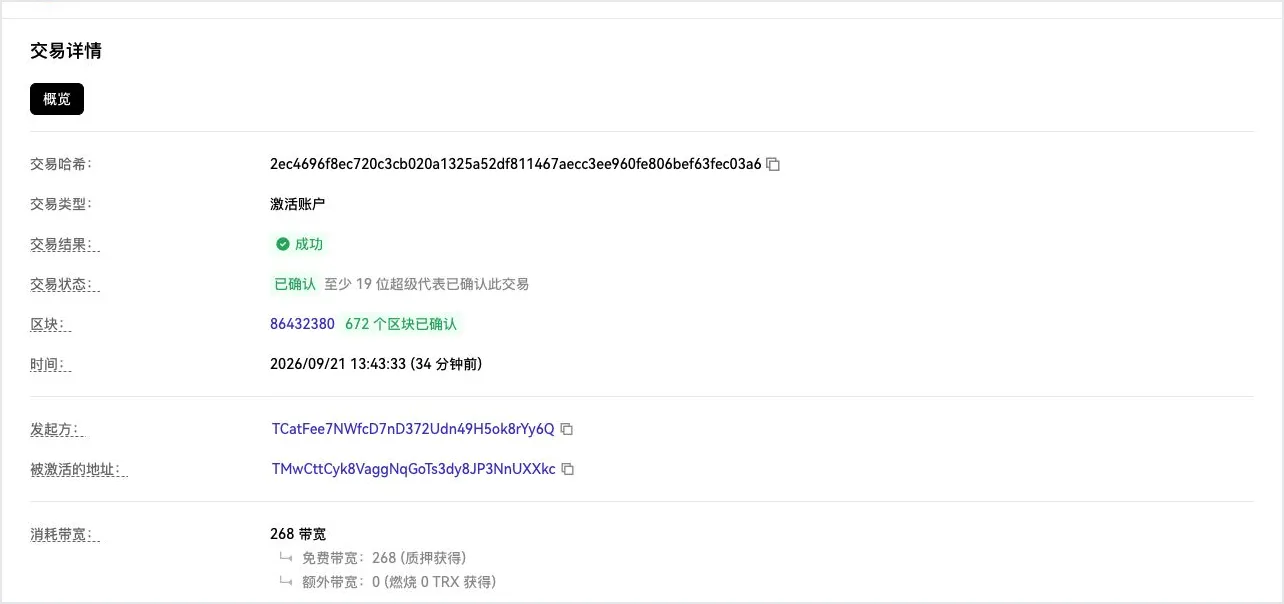
Figure 2: OKLink directly shows “激活账户” (Activate Account). The key things to record are the initiator and the activated address. Open the OKLink example
Method three: activation inside a contract.
This is the easiest one to miss. The outer transaction only shows “触发智能合约” (Trigger Smart Contract); you have to click through to “内部交易” (Internal Transactions) to see whether the contract sent TRX or TRC-10 to a new address. Then check the receiving address’s creation time and earliest records. You can’t draw a conclusion from a single internal transaction alone.
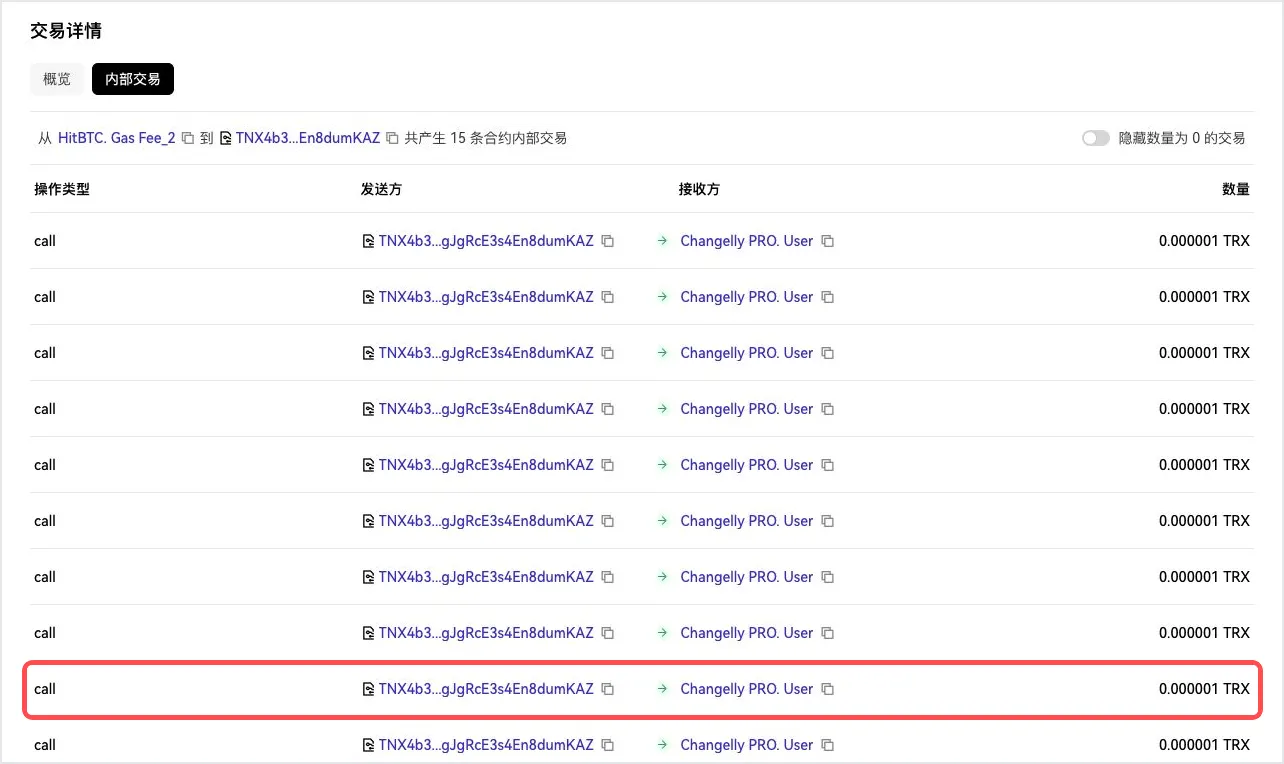
Figure 3: Contract TNX4b3...KAZ sent 0.000001 TRX to each of 15 addresses at once. The recipient in the red box is TA4MjU...Afqe. Its account creation time matches this parent transaction, and before it there is no successful native incoming transfer or explicit activation. Open the OKLink internal transactions
If a batch of wallets was activated by the same address, the same first top-up sender or the same contract, that is a strong historical link. But you still have to rule out exchanges, bulk account-opening tools and public fee-payment services.
Note: USDT is a TRC-20 token, so receiving USDT alone isn’t one of the native activation methods above. This post is about ordinary wallet addresses; smart contract addresses are created by deployment transactions, which is a different matter.
Step two: look at permission relationships.
Control relationships and multisig relationships aren’t two completely separate mechanisms. Both come from TRON’s account permission settings; they just control the account in different ways.
The first is sole control.
On OKLink, open the “更新账户权限” (Update Account Permission) transaction and focus on the addresses, weights and threshold. If one address’s weight already reaches the threshold, it can operate the wallet on its own. That’s a direct control relationship.
This is common for project treasuries and teams that divide up management duties, and it can also appear after a wallet’s permissions have been maliciously changed.
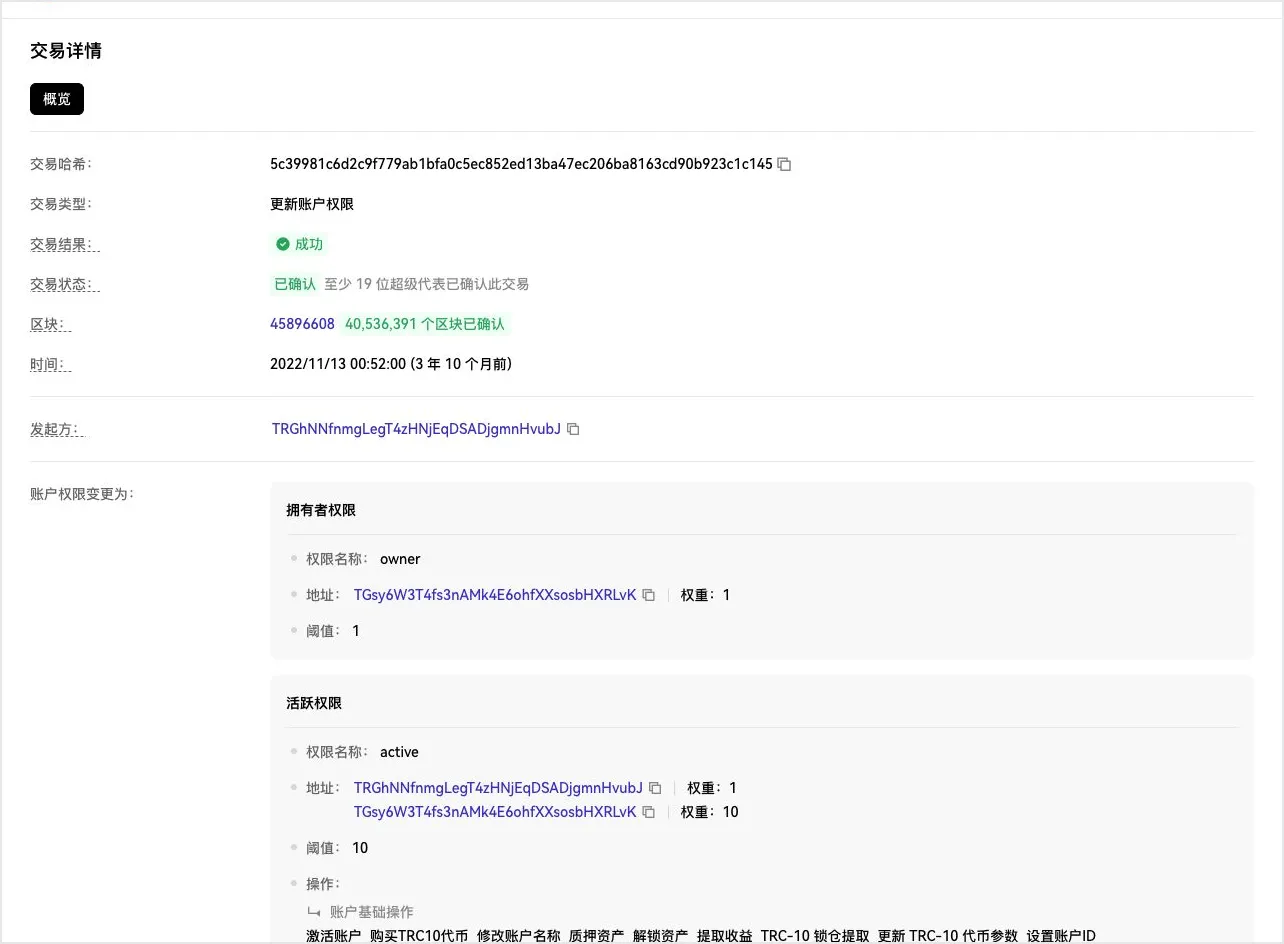
Figure 4: The controlling address has a weight of 10 and the threshold is also 10, so it can meet the permission requirement on its own. Open the OKLink example
The second is joint control, that is, multisig.
If a permission group contains several addresses and none of them has enough weight to reach the threshold on its own, several addresses must sign together. These addresses form a clear joint-management relationship.
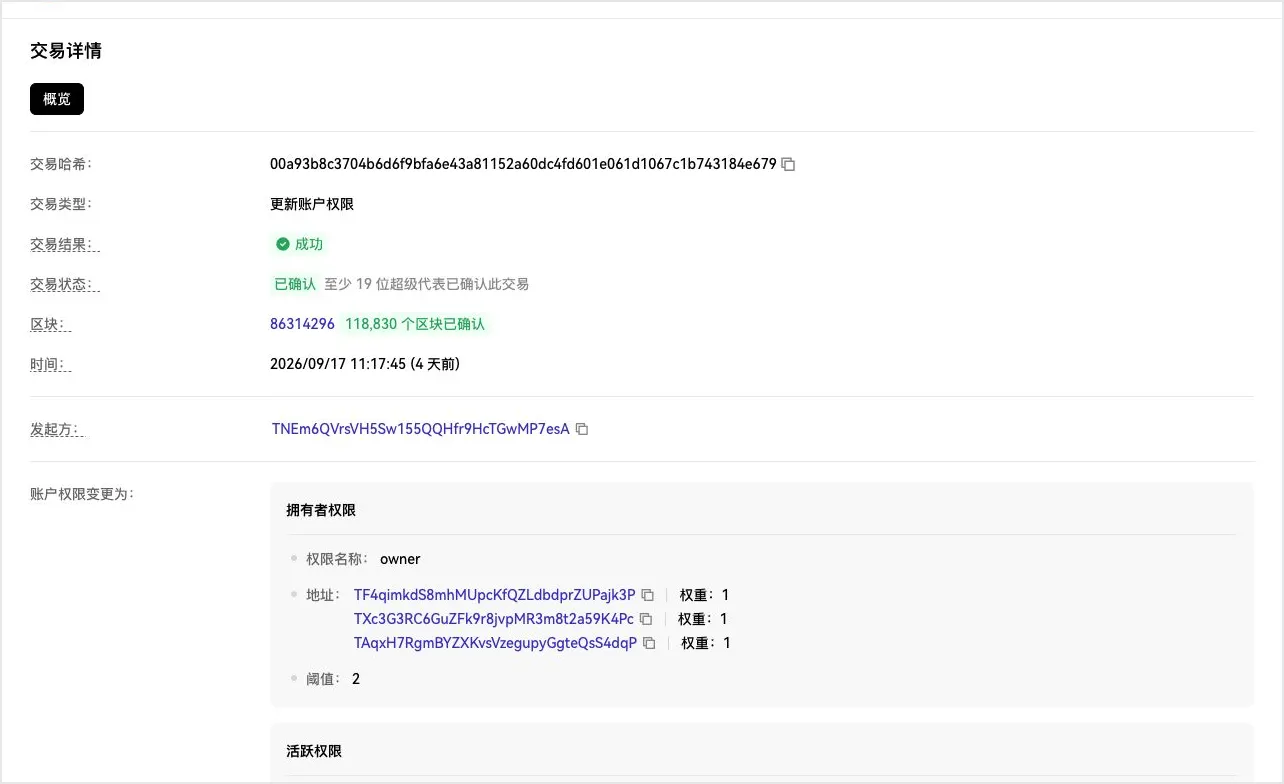
Figure 5: All three addresses have a weight of 1 and the threshold is 2, so none of them can operate the account alone. Open the OKLink example
So control is the broader concept: it can be one address controlling on its own, or several addresses controlling together. Multisig is just one form of it.
Step three: finally, look at resource relationships.
Sending USDT on TRON consumes energy. An address can stake TRX, delegate the resulting resources to another wallet, and take them back once they’ve been used.
If the chain shows “delegate resources, wallet transfer, reclaim resources” in a row, with the three actions closely timed, that forms a very recognizable chain of operations.
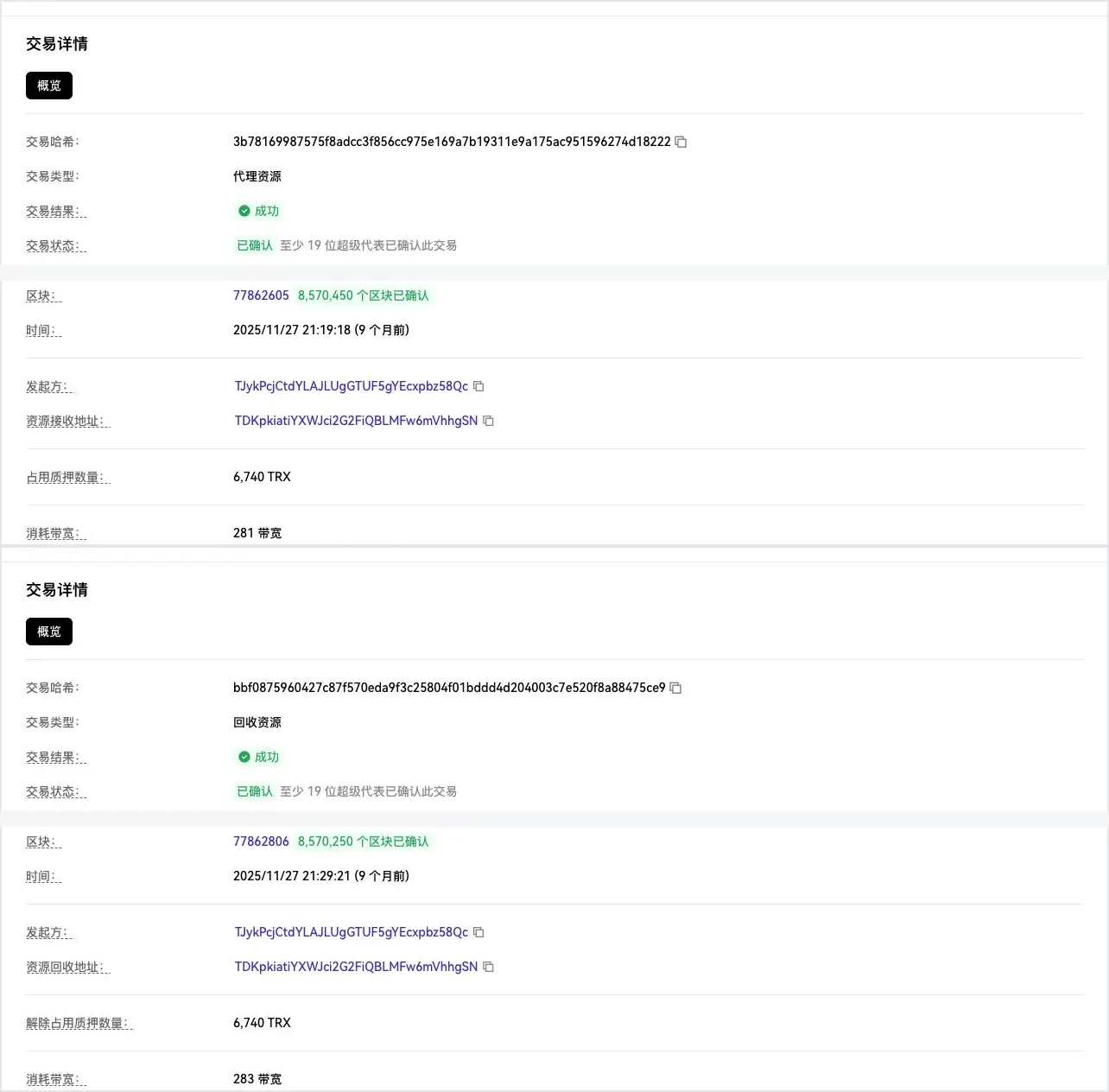
Figure 6: In the two transactions above and below, the initiator, the receiving/reclaimed address and the 6,740 TRX match exactly. Delegation example · Reclaim example
This can prove that the two addresses have a resource-service or operational relationship. If the same address repeatedly serves a batch of wallets, that’s when it’s more worth clustering further.
When analyzing how two wallets are related, you can check in this order:
- Who made it appear on chain for the first time?
- Who can control it, alone or jointly?
- Who is providing it with resources and taking them back?
- Finally, cross-check against transfers and shared counterparties.
These are all strong relationships that can be verified on chain, but “related” doesn’t mean “belongs to the same person.” Public service providers, custodial platforms and teamwork can all leave similar records, so it’s best to have two or more clues back each other up.
If there’s strong demand for batch analysis, I may later write about a Skill that automatically organizes these records and finds the relationships addresses share.