Let an AI agent query the chain itself: getting the most complete TRON data through the TronScan API
Paging through a block explorer and exporting one address at a time is really just moving data around. This post shows how to set up an AI agent, give it a TronScan API key, let it look up TRON wallets on its own, and what happened when we tried it.
Here is how people follow money on TRON today: open a block explorer, enter an address, page through the transfers, click export, wait for the download, pass a CAPTCHA; see the next address, and do it all again. Follow three hops and you have a dozen or so addresses, a dozen exports and a dozen spreadsheets. What the person is doing in all this isn’t analysis. It’s moving data around.
This post is about handing that step off: set up an AI agent, give it a TronScan API key, and just say “look up this address.” It sends the requests, pages through the results, checks them, and puts the answer in front of you.
There are three benefits, in order of importance. First, it saves effort: one sentence per address, no more clicking. Second, you get more: browser exports stop at 10,000 rows and some information, such as permissions, can’t be exported at all, while the API returns all of it. Third, and most important looking ahead: once the agent is fetching the data itself, you have a foundation for letting it analyze that data and follow the money further on its own.
What is an API
Let’s start with the term. When you open the TronScan website, enter an address and see a page of transfers, that’s the window the site opens for people: easy to read, but someone has to do the clicking.
An API is a door the same site opens for programs. A program sends a request to a fixed URL, such as “give me this address’s USDT transfers, starting from record 0, 50 records,” and the site replies with data a program can read. For the next page, it sends another request with “record 0” changed to “record 50.” No pages, no buttons, just question and answer.
The website and the API sit on top of the same data; the only difference is who is asking. On the website a person asks, one page at a time. Through the API a program asks, several times a second, and never gets tired even after ten thousand requests. TronScan keeps this door open, and you can apply for a key for free. The key works like an access card: it’s how the site knows who is asking and how many times.
What the API gives you that the website doesn’t
The API gives you three things the website doesn’t.
Less manual work. Page through the website too fast and you get a CAPTCHA. Exports have to be clicked, waited for and downloaded by hand, and then repeated for the next address. The API has none of this: the program sends requests and the program receives results. Ten addresses are as easy as one.
More data. The website and its exports only show you the first 10,000 records. The API lets you query by time range: first ask for “January to August 2023,” then for “August 3.” Whenever a range goes over 10,000 records, cut it in half again, and stitching the ranges together gives you everything. I tried this on one of Binance’s hot wallets. Its account details say it has 54.97 million transactions. The website stops after 10,000; querying by time range, every earlier range had records.
More detail. The website tucks many fields away on secondary pages; the API returns them all at once. The classic example is permissions. A TRON wallet can hand its control over to another key, or be set up as multisig. When several wallets share one key, the same person is managing them. That’s some of the strongest evidence there is for judging how wallets are related, and it isn’t in the export file. The “account details” endpoint returns the owner and active permission groups directly: which keys are in each group, each key’s weight, and the threshold. A key whose weight reaches the threshold can operate the wallet on its own.
Setting up an AI agent
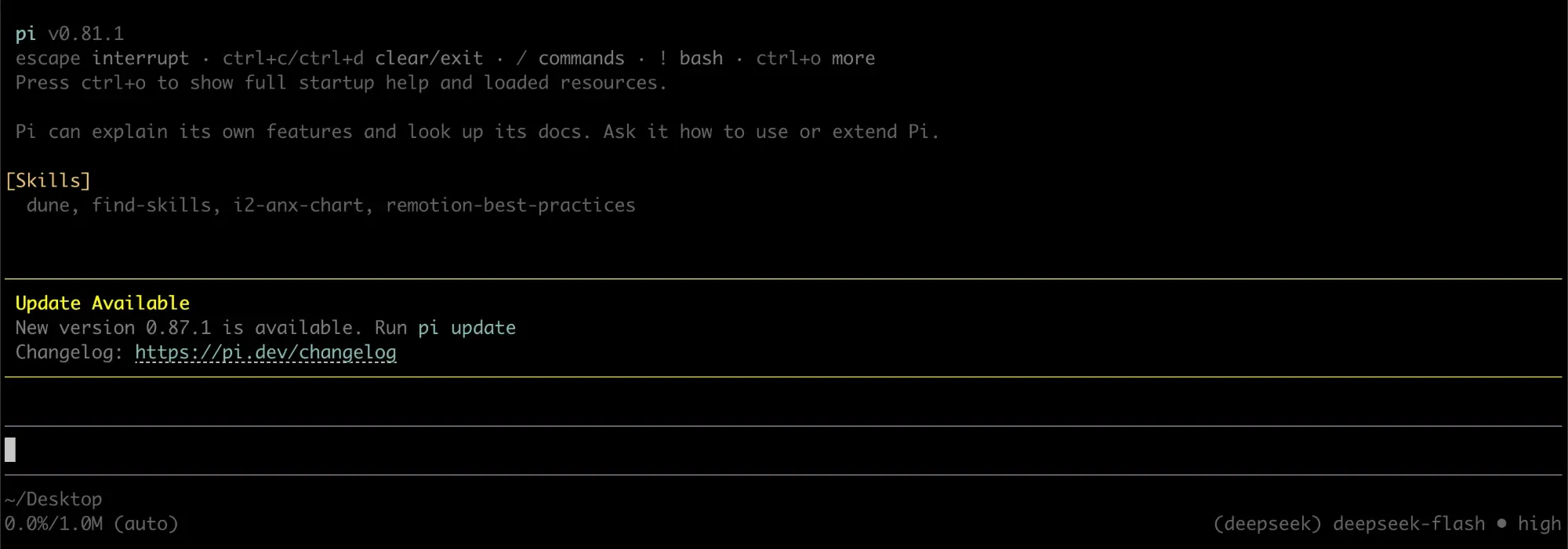
An API needs a program to call it. Today you can let an AI agent run commands, read the results, and then decide what to look up next. Pi Agent, Codex, Claude Code and Hermes can all do this. Below I use the open-source Pi Agent for the demo. Installing it takes one command:
npm install -g @earendil-works/pi-coding-agentOnce it’s installed, type pi in the terminal to open the chat interface. It also needs to be connected to a large language model; I used DeepSeek’s official Flash model and set it as the default.
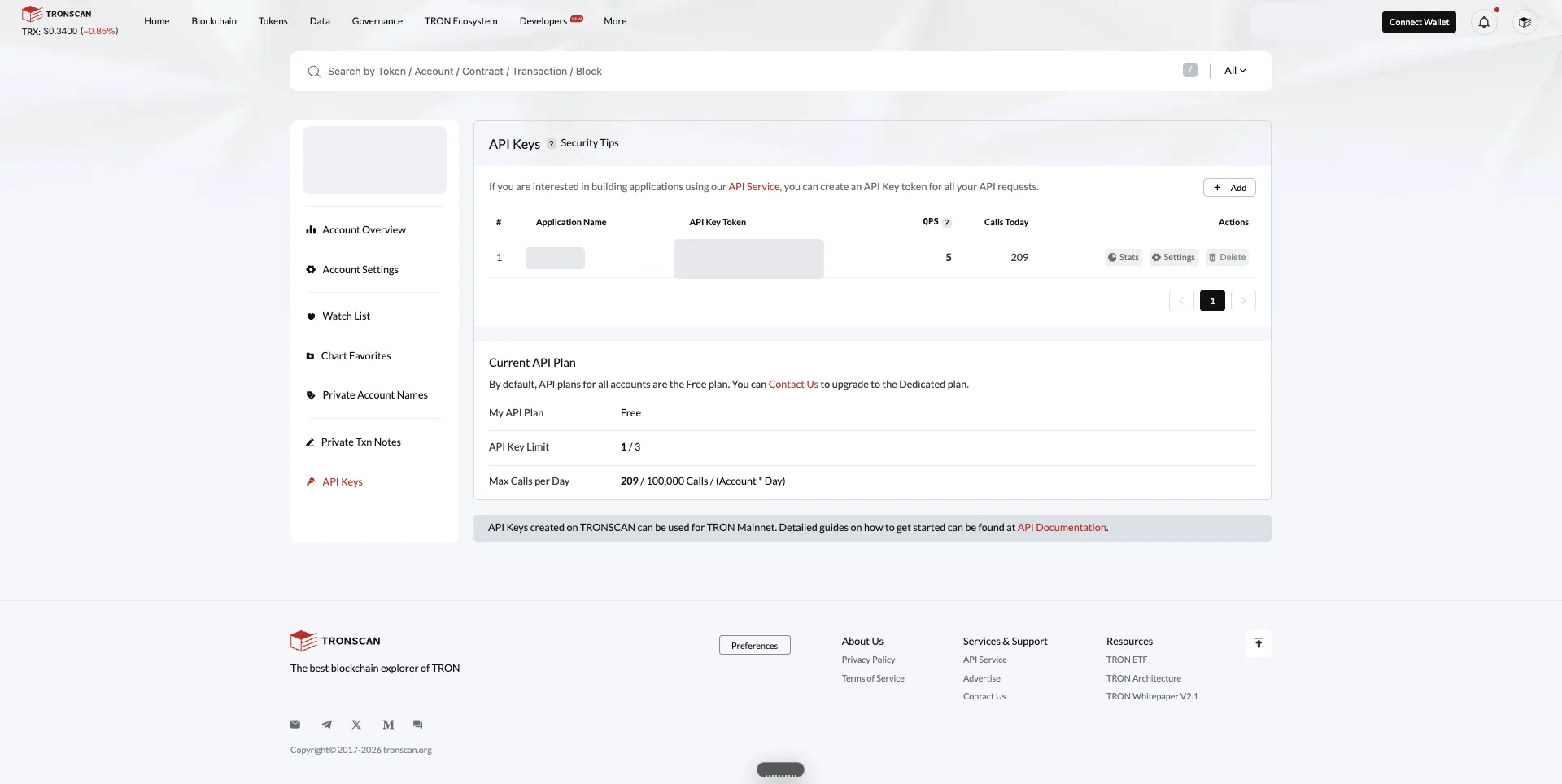
Next, apply for a TronScan API key: after logging in, go to the API Keys page in your account center and click Add. When I used it, the free tier allowed 100,000 calls a day and 5 calls a second, which is plenty for looking up a few wallets.
Handing the TRON API key to the AI agent safely
Treat an API key like a password. The agent runs commands and passes their output to the language model. If the key shows up in that output, it may end up both in the model’s context and in the local session log.
You can write the key into a file that only your user account can read. Run these three commands in order:
mkdir -p ~/.config/tronscan && chmod 700 ~/.config/tronscanecho 'TRONSCAN_API_KEY=your-key' > ~/.config/tronscan/tronscan.envchmod 600 ~/.config/tronscan/tronscan.envBefore starting the agent, load this file into the current terminal:
set -a; source ~/.config/tronscan/tronscan.env; set +a; piAn agent started this way can read the key from the environment variable. When you ask it something, you still need to tell it explicitly not to print the key. In my experiment, the first thing it did was print the key’s length: 36 characters. It didn’t leak the value itself, but it was a reminder that this instruction can’t be left out.
Experiment: letting Pi Agent look up a wallet on its own
I gave Pi Agent an address whose answers I already knew and asked three questions: Who can operate this wallet? How many USDT transfers does it have, and when were the earliest and the most recent? Who first sent it TRX?
The prompt, translated from the Chinese original:
Use TronScan’s public API (https://apilist.tronscanapi.com) to look up the TRON address TRGhNNfnmgLegT4zHNjEqDSADjgmnHvubJ and answer three questions:
- This account’s permission configuration: which key addresses, weights and thresholds are in the owner and active permissions? Which key can operate this account on its own?
- How many USDT (contract TR7NHqjeKQxGTCi8q8ZY4pL8otSzgjLj6t) transfers does this account have in total? When were the earliest and the most recent?
- Who sent it the earliest TRX it received?
The API key is already in the environment variable TRONSCAN_API_KEY; pass it in the HTTP header TRON-PRO-API-KEY. Never print the key’s value to any output, file or command echo. First check the documentation or probe the endpoints, then query step by step, and finally give your conclusions in Chinese.
I didn’t tell it which endpoints to use. It first tried the “account details” endpoint and found the permission configuration. Then it queried USDT transfers, checking the counts for incoming, outgoing and all records separately. Finally it queried TRX transfers in ascending time order and found the earliest one.
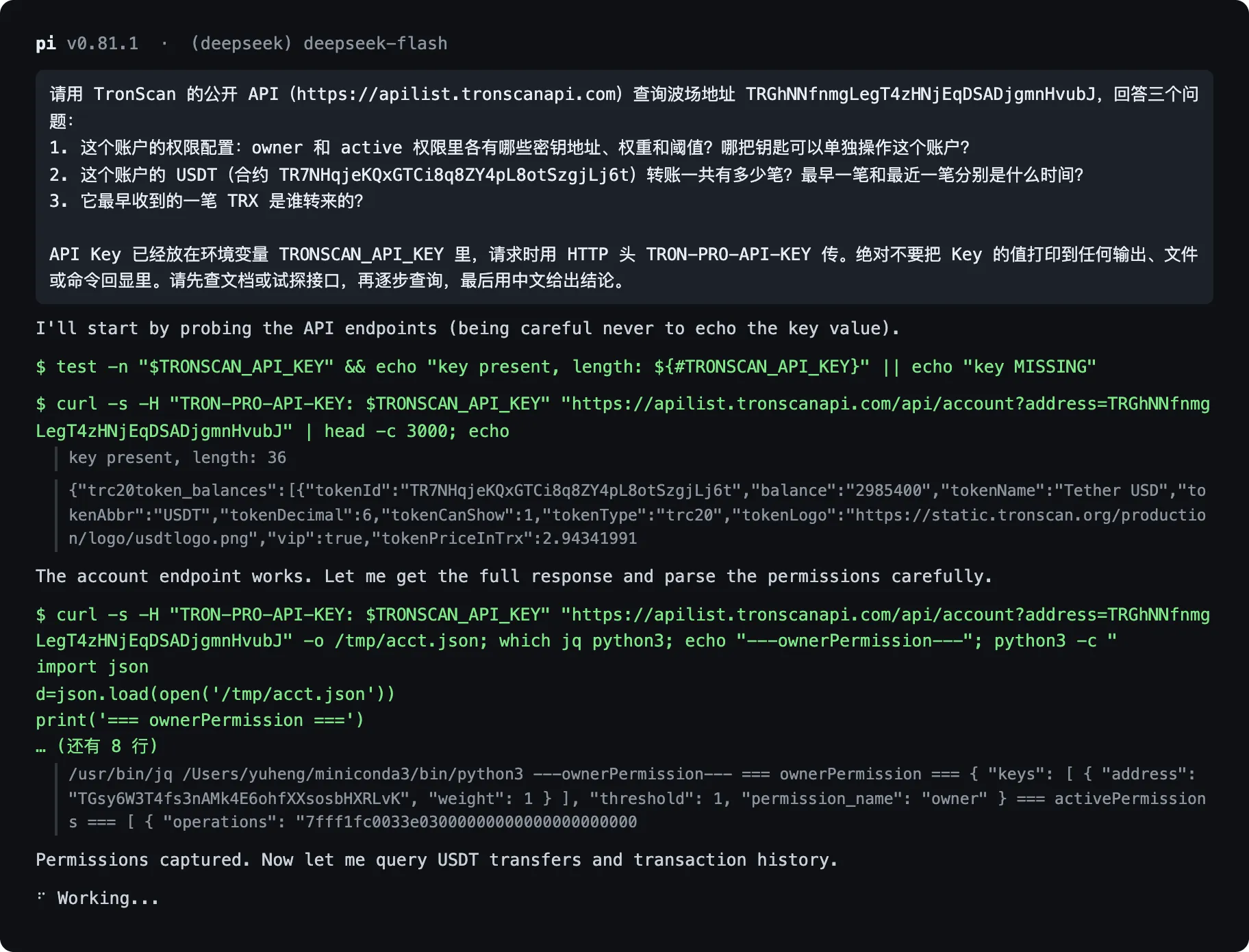
After a little over four minutes and 12 commands, it had answered all three questions correctly.
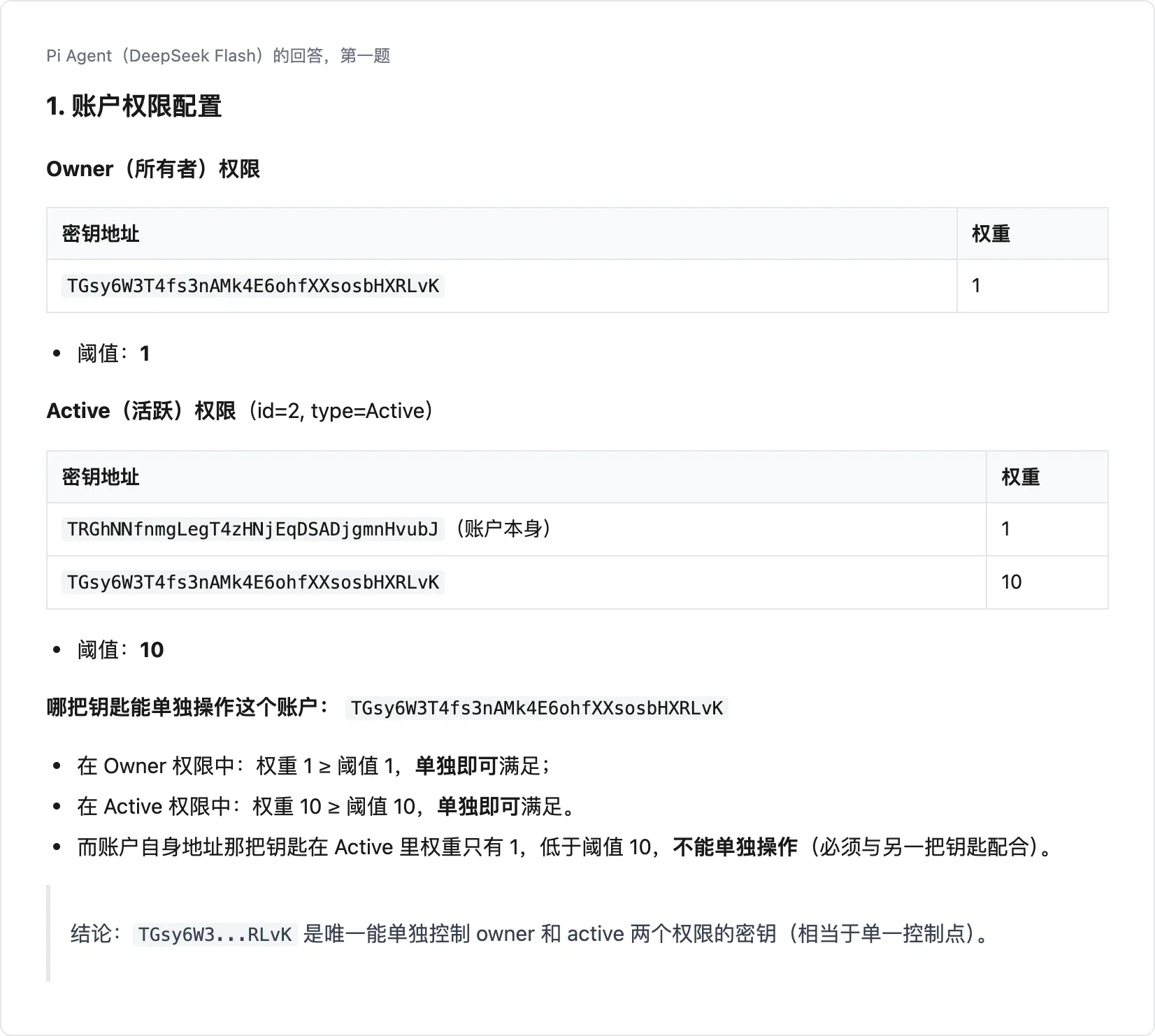
On permissions, both the owner and active permissions point to another key. The wallet’s own key has a weight of only 1, while the operating threshold is 10, so it can’t operate the account on its own.
There were 3 USDT transfers in total, spanning November 2022 to January 2023. Partway through, the agent noticed that one endpoint parameter wasn’t filtering by token as expected, so other tokens had crept into the results. It changed the parameter and queried again before confirming that all 3 were USDT.
The earliest incoming TRX was 1 TRX sent by that controlling key on October 26, 2022, which was the transfer that activated the account.
I ran the same question a second time. That time, seeing that the wallet’s own key couldn’t operate the account on its own, the agent declared that “this is a typical decoy address.” That went too far: the on-chain data only shows that control sits with another key, not why it was set up that way. This is one example of why the agent’s judgments still need a person to check them.
Summary
Once the AI agent is set up and you have applied for and safely stored a TronScan API key, you can just ask. Account permissions, older transactions, where the first TRX came from: these used to take repeated clicking on the website. In this experiment the agent found them in a little over four minutes, and the model calls cost a few cents.
The results still need checking, especially any inferences the agent draws from the data. But the repetitive work of paging, exporting tables and finding records one by one can already be handed to an agent.
We focus on AI agents for on-chain fund tracing. We want them to take on the work of finding, organizing and checking records one by one, while keeping every conclusion traceable to the original on-chain records.
If this direction interests you, or you’re dealing with a real problem like this in your work, feel free to get in touch.